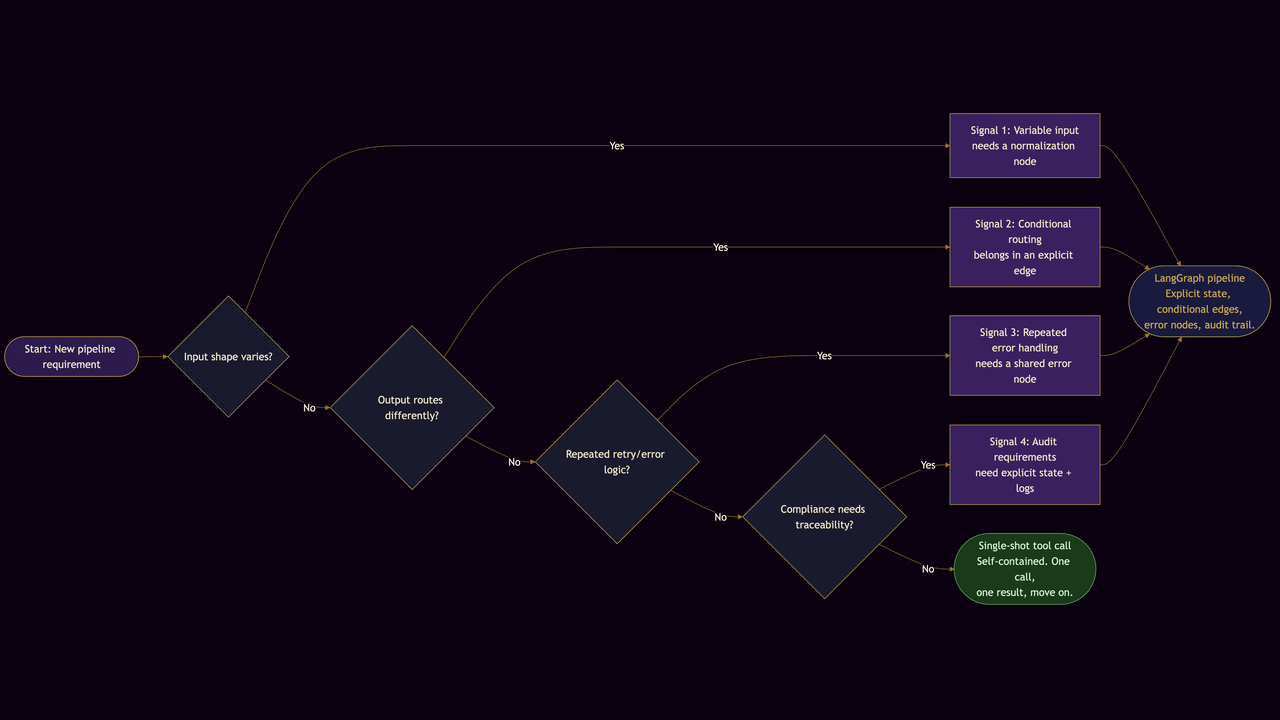
Single-shot tool-calling is the right default when a request is self-contained: one call, one result, move on. LangGraph is the right choice when your pipeline needs explicit state, conditional branching, or an audit trail that survives a crash. Knowing where that line sits saves you from a premature rewrite on one end and from months of fragile patchwork on the other.
I have written about building a first LangGraph pipeline and about deploying LangGraph into existing data infrastructure. This post covers the earlier question: how do you know it is time to make that move at all?
When the single-shot pattern starts to strain
A single-shot tool call works cleanly when the input is predictable and the output is all the downstream code needs. The pattern starts to cost you something under three conditions.
The first is variable input size or schema. A model that summarizes a 200-row CSV will behave differently when the same endpoint receives a 20,000-row file. Once you start adding pre-processing steps -- filtering, type conversion, enrichment -- those operations hide inside the prompt or accumulate as ad-hoc Python stitched around the call. The pipeline looks like a single step but is not.
The second is decision points that affect downstream routing. Picture a workflow that pulls a list of financial transactions, flags those above a threshold, and routes flagged items to compliance review while sending the rest to a reporting dashboard. If the flagging logic lives inside the model response, you lose the ability to audit why a particular transaction was routed the way it was. There is no explicit state to inspect, and no place to attach a log entry.
The third is accumulated error handling. When a tool returns an unexpected schema, you add a conditional check. Then one for rate-limit errors. Then one for the edge case where the upstream API times out at exactly the wrong moment. The code still looks like a single call but is surrounded by a maze of special cases that only the original author fully understands. Adding a new team member becomes a risk.
What explicit state and branching give you
LangGraph's core addition is a shared state dictionary that persists across nodes. Each node reads what it needs, does one thing, and writes its result back to state. That sounds like a small change, but it resolves all three of the problems above.
Handling variable inputs becomes a node. Instead of pre-processing inside a prompt or around a call, you write a node whose sole job is to normalize the input before the next node sees it. The graph makes that step visible, testable, and replaceable without touching anything else.
Conditional routing becomes an edge. In the compliance example, a node that evaluates the transaction amount sets a flag in state; a conditional edge then sends the flow to the "review" branch or the "report" branch based on that flag. The branching logic sits in the graph definition, not inside a prompt string, which means you can read it, version it, and change it without re-prompting.
Error handling becomes a node too. You can attach a retry node to any step, centralize timeout logic in one place, and route failures to a logging node that records what went wrong. The try-except blocks stop multiplying.
Observability is the compounding benefit. Because each transition can emit a log entry with node name, input snapshot, and output snapshot, you get a run timeline without any additional instrumentation. When a compliance auditor asks which rule flagged transaction 4,217, you can show them the exact state at the flagging node.
Four signals it is time to make the move
I use four practical tests when evaluating whether a new pipeline warrants a graph from the start.
The first signal is that the tool must handle meaningfully different input shapes. If you find yourself writing shape-detection logic to guard a single call, that logic should be a node.
The second signal is that the model output determines which downstream system receives data. Any time the output of one step controls where the next step sends results, you have a branch. Encoding it as an edge is safer and more readable than encoding it as a conditional inside the prompt.
The third signal is that you have written the same retry logic twice. Once is reasonable. Twice means you have a pattern that belongs in a shared error-handling node rather than scattered across the codebase.
The fourth signal is that the pipeline will face a compliance or audit requirement. If regulators or internal reviewers will ask how data moved through the system, the explicit state and log entries that LangGraph produces are much easier to present than a reconstruction from application logs.
Any single signal is enough to warrant a graph. Multiple signals together mean a single-shot approach will cost you maintenance time within weeks.
Getting started without a full rewrite
The transition does not require throwing out what you have. A two-node graph -- one node for the tool call and one for validation -- is a reasonable starting point. It introduces the state dictionary, makes the validation step explicit, and gives you a place to add a retry node if the call fails. From there you can extend the graph one node at a time as the need arises.
The hub post on building a first LangGraph pipeline walks through the essential steps: defining state, wrapping tool calls in nodes, adding conditional edges, and attaching error-handling nodes. The observability guide covers what to log at each transition so you can debug runs without replaying the entire pipeline. For finance-focused implementation detail, the case study at /work/finance-pipeline shows how a 19-node graph reduced manual reconciliation time by more than half on a production ledger pipeline.
If you are at the point where your current tool-calling code is starting to fight back, those three posts cover the path from the first graph to a deployed, monitored pipeline.
For help designing the graph structure for your specific stack, see /services or reach out through the contact page.
PS: Get posts like this delivered weekly -- subscribe to Dispatches from the Labyrinth.