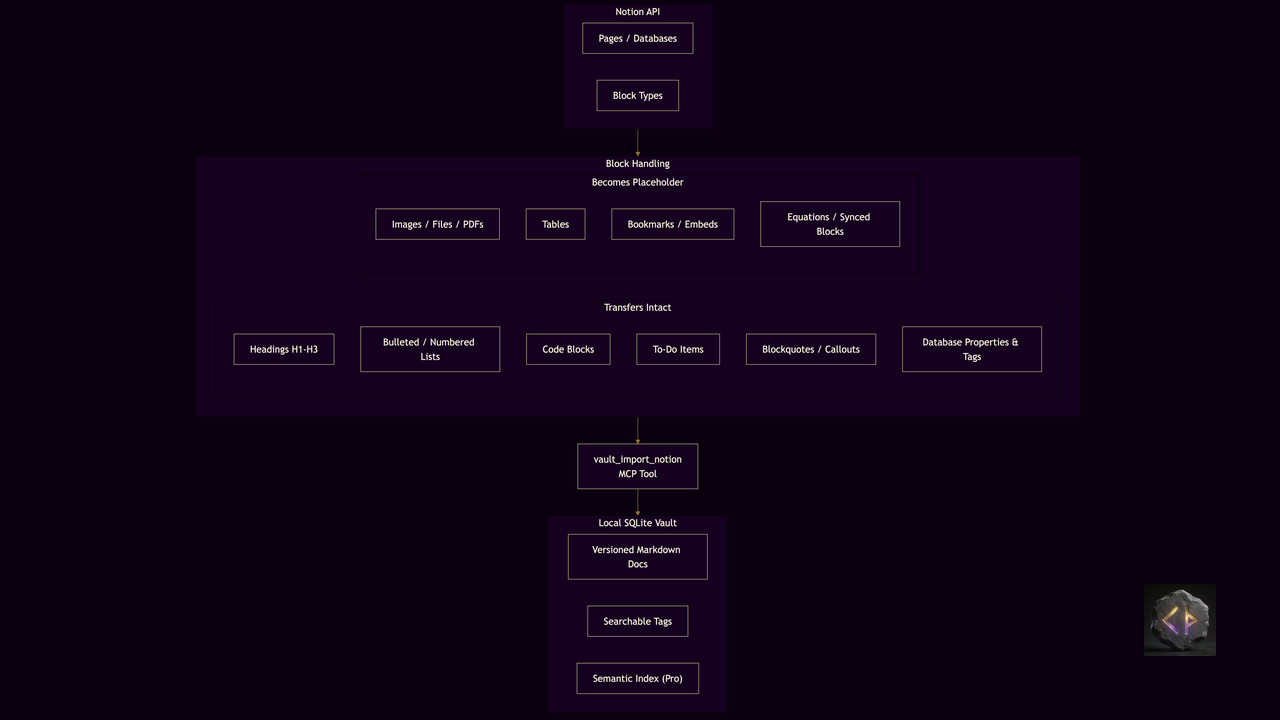
The switching cost of leaving Notion is not the export button. It is not knowing what happens to your content on the other side. This post walks through a real transfer using LoreDocs' Notion import: what block types survive intact, which are replaced with searchable placeholders, and where you will need to spend a few minutes restructuring by hand.
This is the how, not the why. If you are still weighing whether to move, the LoreDocs vs Notion MCP comparison covers the tradeoffs. The Obsidian import guide covers the same mechanics for Obsidian workspaces. Come back here once you have decided which workspace to start with.
How the import works
LoreDocs' Notion import fetches content directly from the Notion API -- you do not need to export a ZIP file or convert to markdown first. You give it a list of page IDs or a database ID, and it retrieves the blocks, converts them to plain text, and stores each page as a versioned document in a vault you specify. The source data stays in Notion; LoreDocs takes a snapshot.
Setup takes two steps. First, create a Notion integration at developers.notion.com and copy the integration token to your NOTION_TOKEN environment variable. Second, share the pages or databases you want to import with that integration -- Notion's access model requires explicit sharing before the API can read a page.
Then import via MCP:
vault_import_notion(vault="my-vault", page_ids=["<page-uuid>"])
Or for an entire database:
vault_import_notion(vault="my-vault", database_ids=["<db-uuid>"])
For large workspaces the tool supports max_pages and continuation_token for batched import, so you can import incrementally without re-fetching pages already stored.
What transfers intact
Most of the prose structure survives without changes. Headings at all three levels (H1, H2, H3) become standard markdown headers. Bulleted and numbered lists keep their syntax, including nested indentation. Code blocks retain the language tag, so a Python block stays a Python block. Checked and unchecked to-do items are preserved as - [x] and - [ ], though the vault does not provide a dynamic task interface -- the checkboxes are stored as text. Paragraph text, blockquotes, callouts, and toggles all transfer as readable markdown, with callout text converted to a blockquote and the original icon stripped.
Properties and tags from Notion databases transfer as well. A page that carries a "Status: Active" property and tags like "machine-learning" and "experiment" will arrive with those as LoreDocs tags, making them searchable immediately after import.
What lands as a placeholder
Three categories of content cannot be represented as plain text and are stored as searchable placeholders instead.
Images, files, PDFs, and videos become a single-line note that includes the original caption if one exists -- for example, the caption text wrapped in brackets with a type prefix -- or a generic note that the asset was not imported when no caption was set. The original binary files are not fetched. If you need the image inside the vault, you can add a relative path reference after storing the file alongside the vault directory, or link to the hosted URL.
Tables are replaced with a single-line note indicating that the content is structured data that may need to be imported as a separate document. Notion tables are structured objects that do not map cleanly to plain text. For tables that matter to your analysis, the most practical path is to export that specific database from Notion as a CSV and add it as a separate LoreDocs document.
Bookmarks and web embeds become a single-line note with the URL. The content at the linked URL is not fetched. If the embed was a reference you need to keep, the URL in the note is still searchable.
Equations, synced blocks, and link previews are also treated as active HTML and stored as placeholder text rather than rendered content.
What you will need to restructure
Database pages that reference other pages lose their relational links. Notion's internal [page link] syntax is not converted -- those become plain text or are dropped. If you used relations heavily to connect notes across databases, you will need to decide which connections to recreate as manual cross-references or vault tags.
Comments and page-level discussion are not part of the Notion API's block tree, so they do not import. If you need to preserve discussion, export the comments separately via the Notion API and append them to the relevant document before import.
Column layouts render as linear text. Notion allows side-by-side columns, but LoreDocs stores flat markdown. The content is present, but the two-column visual arrangement is gone.
After the import
Run a quick full-text search for "table:" and "image:" to get an inventory of placeholder lines. For critical tables, open the corresponding Notion database, export it as CSV, and add it as a separate document via vault_add_doc. For images that illustrate a key concept, host the file alongside your vault directory and update the placeholder with a markdown image link.
If you are on the Pro tier, running the semantic index after import makes the vault queryable by meaning, not just keywords. A query like "the sprint where we switched from batch to streaming" will surface the relevant document even if those exact words do not appear in the title.
The vault is portable once built. Copy the LoreDocs data directory to another machine and the import is there, versioned, and queryable -- no Notion dependency required to read or search what you brought over.
More on the full LoreDocs toolset: labyrinthanalyticsconsulting.com/tools.
Get posts like this delivered weekly: subscribe to Dispatches from the Labyrinth.
Interested in lifetime access to LoreDocs Pro? Join the waitlist.